
Evidence note: Models Desk synthesis from public multimodal documentation, model cards, and production architecture patterns as of 2026-08-17; this article does not publish private video latency scores.
Quick answer
Multimodal video AI in 2026 usually means a stack—not one monolithic model: vision or video encoders turn frames or clips into tokens, a language backbone reasons over those tokens plus text, and an inference layer must hit latency budgets for your product (batch upload vs near-real-time streaming). Real-time AI is not magic low latency on full frontier models; it is a design choice combining frame sampling, model size, edge vs cloud, caching, and acceptable quality loss. Builders should separate understanding (what happens in this clip?), generation (synthesize new video/audio), and interaction (live camera + voice)—each has different hardware, cost, and failure modes. Start from user latency tolerance, not from demo reels.
Key takeaways
- Video multimodal pipelines add preprocessing (decode, sample frames, resize) before the LLM sees tokens—ops failures often live there, not in "reasoning."
- Real-time typically means sub-second to a few seconds for a UX step; full-video understanding of long files is batch-shaped even when marketed as "instant."
- Open-weight vision-language models enable self-hosting; frontier video features often ship on closed APIs first (open vs closed frontier).
- Token volume from video dwarfs text—budget inference before feature ship (inference economy).
- Agents that watch screens multiply cost and risk (chatbot to agent map).
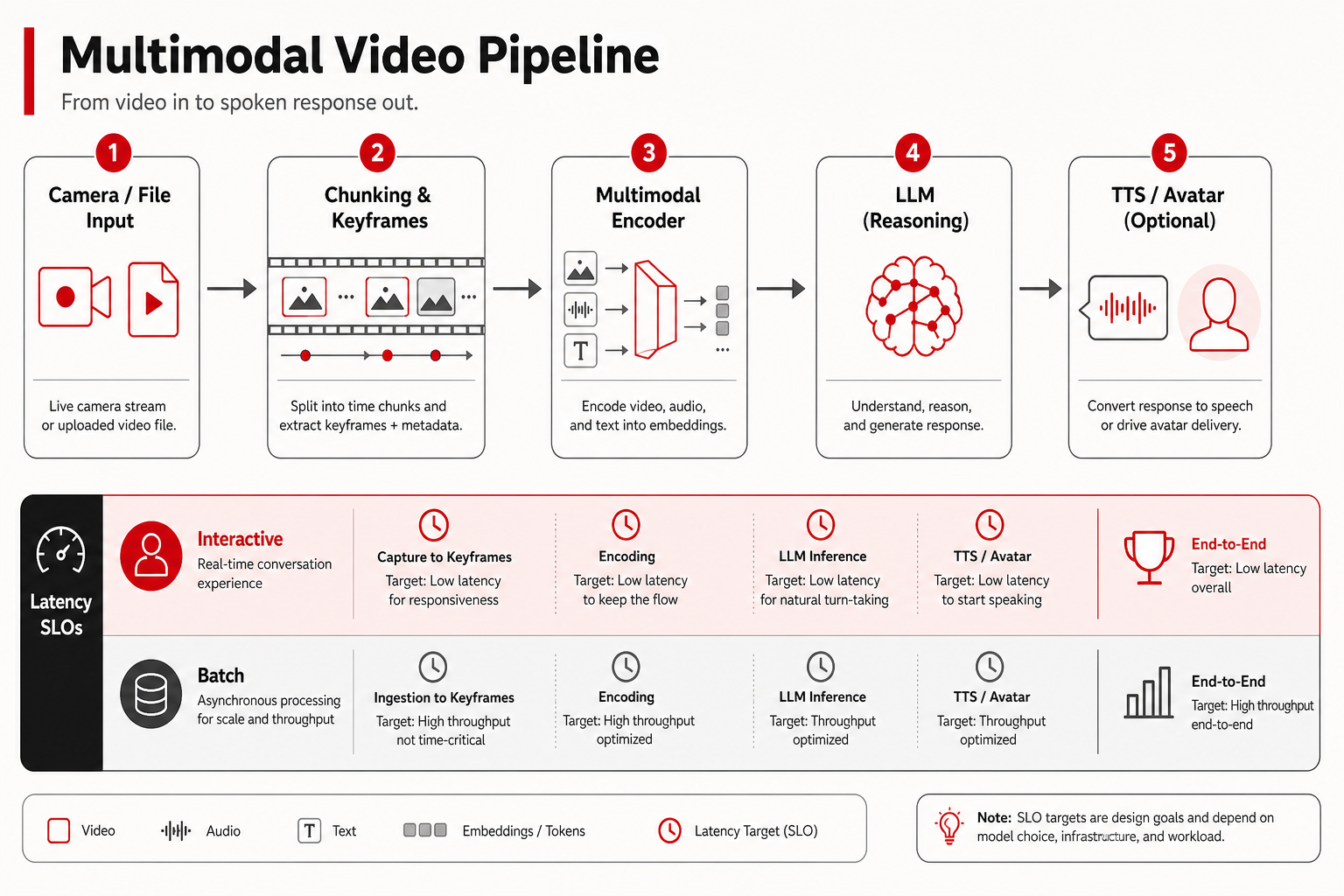
What multimodal video AI measures (and what it does not)
Understanding tasks
Video understanding covers captioning, Q&A over clips, event detection, OCR in frames, moderation, and summarization for meetings or security footage. Models are evaluated on public sets (action recognition, video-QA benchmarks named in papers)—scores indicate research progress, not your warehouse camera layout at night. Read scores with the same skepticism as text leaderboards (how to read AI leaderboards).
Understanding does not guarantee temporal precision to the frame unless the product spec says so. Many systems sample one frame per second—or adaptive keyframes—and miss brief events.
Generation tasks
Video generation (text-to-video, image-to-video, extension, inpainting) is a different stack: diffusion or autoregressive world models, heavy GPU memory, and seconds to minutes per clip. "Real-time generation" in marketing often means fast preview tiers, not broadcast-quality long takes. See creative stack reference (generative design, video, audio stack).
Interactive / streaming tasks
Real-time interaction—live camera feeds, wearable assistants, robotics, gaming copilots—requires pipelined inference: capture → encode → model → act. Latency budgets drive tiny encoders, edge GPUs, and sometimes speech-only fallback. Full frontier VLM on every frame rarely fits consumer hardware.
Architecture: how video becomes tokens
Most video-language systems follow a pattern documented across public research:
- Decode video to frames or tubelet clips (hardware-accelerated ffmpeg, NVDEC, etc.).
- Sample frames by FPS cap, scene change, or motion heuristic—trade recall of short events for cost.
- Encode each frame or spatio-temporal patch through a vision transformer (ViT) or video encoder; optionally audio encoder for sync tasks.
- Project visual tokens into the LLM embedding space via a connector (MLP, Q-Former-style module, per vendor design).
- Autoregress text outputs conditioned on visual + text tokens—same decoding loop as chat LLMs with larger prefills.
This sits in the broader model stack: pretrain on image/video-text pairs, post-train for instruction following and safety, inference with multimodal KV-cache (model stack 2026).
Audio and lip-sync
Some products fuse audio tracks with video for meeting summarization or moderation. Audio adds another encoder stream and synchronization logic. Real-time voice+video assistants may use separate ASR and TTS pipelines glued in orchestration—not one unified "omni" model—unless vendor docs state otherwise.
Real-time vs batch: define your latency SLO first
| Class | User-perceived target | Example product shape | Model pattern |
|---|---|---|---|
| Interactive | < 300–800 ms per step | Live hints on camera feed | Small VLM / edge; heavy sampling |
| Responsive | 1–5 s | Upload 30 s clip → summary | Mid-size VLM API; parallel preprocess |
| Batch | Minutes | Hour-long webinar index | Chunk + map-reduce; async queue |
| Generative | Seconds–minutes per clip | Marketing b-roll from prompt | Diffusion / video gen cluster |
Calling a batch summarizer "real-time AI" confuses procurement and SRE. Write SLOs in the PRD before model selection.
Inference economics for video
Video blows up prefill tokens. A one-minute clip at one frame per second might add hundreds of visual tokens per frame after patching—exact counts vary by encoder and resolution. Long-context pricing that already hurts text RAG hurts more with video (long context in practice).
Cost levers builders actually control:
- Resolution and crop—ROI on regions of interest vs full 4K frame.
- Frame rate cap—adaptive sampling when scene static.
- Two-stage routing—cheap model flags segments; expensive model analyzes flagged spans only.
- Cache embeddings for repeated assets (support libraries, training corpora).
- Batch preprocess on CPU/GPU workers separate from LLM decode.
Closed APIs bundle unknown encoder details; open-weight VLMs let you inspect but you own the pipeline (open vs closed).
Open-weight vs closed for video
Public open-weight ecosystems ship image-language and emerging video-language checkpoints—useful for on-prem moderation and specialized verticals. Closed frontier APIs often lead on integrated streaming products, longer native context on video inputs, and polished tool UX. The gap closes unevenly; verify on your resolution, frame rate, and language mix.
Self-hosting video pipelines adds ffmpeg ops, GPU memory for concurrent decodes, and content safety you cannot outsource—pair with local open-weight checklist for serving discipline, scaled up for video workers.
Product patterns that ship
Meeting and call intelligence
Async batch dominates: record → transcribe (ASR) → diarize → summarize → action items. "Real-time" captions may use streaming ASR separate from VLM. Knowledge-worker stacks combine these with text RAG (AI app stack for knowledge workers).
Security and industrial vision
Often requires edge deployment and fixed cameras—open smaller models plus strict eval on false positives. Regulatory retention limits video storage; inference near camera reduces upload bandwidth (edge and on-device LLMs).
Creative and marketing
Generation-heavy; latency tolerances higher; brand safety and copyright for training data matter (copyright and training data). Multimodal understanding used for asset search and rights tagging.
Agents that see screens
Computer-use agents sample screenshots or DOM snapshots at intervals—video-like in cost profile. Failure modes: stale screen state, mis-clicks, injection via UI (tool use: ships vs demos, browser agents). Real-time here means orchestration latency, not cinematic video understanding.
Quality factors beyond benchmark scores
- Temporal grounding: Can the model cite timestamps or only narrate vaguely?
- OCR and small text: Compression artifacts break UI reading tasks.
- Low light / motion blur: Security footage edge cases rarely in glossy demos.
- Language and dialect in speech+video products.
- Hallucination under uncertainty—models confabulate actions not visible.
Build a gold clip set from your domain with labeled events at known times. Report recall at event level, not BLEU on captions.
Safety, deepfakes, and trust
Video multimodal raises deepfake and moderation stakes: synthetic media detection, provenance signals, and user trust UI (deepfakes and trust stack). Real-time generation products need consent, watermarking where mandated, and abuse monitoring. Understanding models can mislabel manipulated content—do not treat VLM output as forensic proof.
Hardware and deployment sketch
| Tier | Typical hardware | Fit |
|---|---|---|
| Edge / device | NPU, mobile GPU, Jetson-class | Single-camera alerts, offline gate |
| Single server | 1–2 datacenter GPUs | Internal tools, moderate concurrency |
| Preprocess pool + LLM pool | CPU decode fleet + GPU inference | Responsive upload products |
| Managed API | Vendor scale | Spiky traffic, frontier quality |
GPU map for sizing text workloads extends to video with decode overhead (GPU map). Video gen clusters differ from VLM inference clusters—do not reuse capacity plans blindly.
How labs talk about video in 2026
Frontier labs bundle video into flagship multimodal APIs and research posts—capabilities and limits change frequently. Track releases without treating demos as SLAs (lab watch: frontier labs 2026). Reasoning-focused models may consume video as token streams differently from chat models (reasoning vs chat).
Streaming protocols and pipeline timing
Interactive video products rarely send raw MP4 bytes into an LLM. Typical production timing:
- Ingest (100 ms–2 s): upload complete or chunk arrival over WebRTC/RTMP.
- Decode + sample (100 ms–1 s per segment): CPU/GPU ffmpeg pool; parallelize per clip.
- Encode visual tokens (200 ms–2 s): ViT forward; batch frames when latency allows.
- LLM prefill (500 ms–10 s+): scales with visual token count—dominates responsive tier.
- Decode text (streaming): token stream to UI; perceived speed improves even if prefill was slow.
Streaming text output to the client while preprocess continues (pipeline parallelism) is a common UX trick—it is not the same as processing every frame in true real time. Document which stages are parallelized in your architecture reviews.
WebRTC vs file upload
WebRTC paths suit live hints and low-latency moderation triggers; buffer sizes are small; models must be tiny or remote GPUs close to ingest.File upload suits meeting recap and compliance review; you can afford heavier encoders and map-reduce over chapters. Mixing the two in one SKU confuses SLOs—split product surfaces.
Meeting intelligence: end-to-end architecture sketch
A shipped meeting product often chains specialized models rather than one "video LLM":
- ASR for transcript with speaker diarization.
- Text LLM for summary and action items on transcript + slide OCR text.
- Optional VLM on shared-screen keyframes when slides are not exported.
Token economics favor text on transcript for most queries; VLM on keyframes is episodic. Align with knowledge-worker stack patterns (AI app stack). Real-time captioning may use streaming ASR only, deferring VLM to post-call batch—users still label the product "real-time AI" for captions while "AI summary" arrives async.
Moderation and trust pipelines for user-generated video
UGC platforms add classifiers before or after VLM understanding: CSAM detection, violence classifiers, spam overlays. VLMs assist nuanced policy calls but are not sole judges—combine deterministic hashes, human review queues, and provenance metadata (deepfakes trust stack). Real-time moderation targets high-recall first pass with human appeal on false positives; batch moderation tolerates higher latency for precision.
Voice + video copilots
Wearables and live assistants frequently run cascaded stacks: wake word → streaming ASR → text LLM → TTS. Video from a forward-facing camera may enter only on user intent ("what am I looking at?") to save battery and bandwidth. Treat advertised "omnimodal" demos as integration targets—verify which modalities share one context window in your vendor contract vs which are glued client-side.
Generative vs understanding vendor split
Teams that buy one vendor for text-to-video and assume the same API excels at clip Q&A often hit quality or cost walls. Generation clusters need different batch schedulers and safety filters than VLM inference. Our reference map (generative design, video, audio stack) keeps categories separate; procurement should too.
Evaluation checklist for builders
- Fix resolution, FPS sampling, and max clip length in the test harness.
- Include negative clips where nothing happens—measure false event rate.
- Measure p95 end-to-end latency including upload and decode.
- Log GPU memory and tokens per clip for finance review.
- Red-team with adversarial overlays and injection in on-screen text.
- Compare open self-host vs API with identical preprocessing—otherwise you benchmark ops, not models.
Frame sampling strategies in detail
Beyond fixed one-FPS caps, teams use:
- Scene-change detection: keyframe on visual delta; static slides collapse to one frame per slide.
- Motion energy: sports and robotics raise FPS only when optical flow exceeds threshold.
- Audio-aligned sampling: grab frames when speaker diarization marks topic shift.
- ROI crops: track faces or slides; discard letterboxing and black frames.
Each strategy needs eval on false negatives—missed brief events are the usual production surprise. Log sampling metadata with model outputs so debugging reproduces the same frames.
Latency budgets and product copy
Marketing teams love "real-time AI." Engineering should publish internal SLO bands and approve external copy against them:
| Marketing phrase | Engineering meaning (example) | Risk if misaligned |
|---|---|---|
| "Instant video summary" | Async job, median 90 s for 30 min call | Support tickets, churn |
| "Live AI coach" | <800 ms per hint, 0.5 FPS VLM | Latency backlash on device |
| "Understands full movies" | Batch map-reduce, chapter boundaries | Cost blowout if users paste entire files synchronously |
Integration with the 2026 model stack
Video features touch every stack layer (model stack 2026): pretrain on video-text corpora, post-train for instruction and refusal on visual inputs, inference with heavy prefill. When a video feature fails, triage whether OCR preprocess broke, encoder quant regressed, or LLM policy refused—same discipline as text-only routing tables in the stack pillar.
Hardware acceleration and ops hygiene
Video pipelines stress parts of the stack text-only teams skip:
- NVDEC / hardware decode vs CPU ffmpeg—pick based on codec and concurrency.
- Separate preprocess queue so decode spikes do not starve LLM batch workers.
- Object storage lifecycle—retention policies for raw uploads vs derived frames.
- Content hashing to skip re-encoding identical re-uploads in moderation workflows.
GPU sizing should include preprocess headroom; text-only vLLM calculators underprovision video products. Cross-check GPU map and inference economy when bidding infra budgets.
Open-weight video-language models: practical notes
Open VLMs enable on-prem review of sensitive footage and custom fine-tunes on proprietary visual taxonomies. Expect to own:
- Encoder + LLM version skew when community merges adapters.
- Safety tuning after fine-tune—base instruct refusals may weaken.
- Benchmarks on short clips that mislead for hour-long surveillance tasks.
Closed APIs remain relevant for fast multimodal experiments before you commit ops to self-host. Compare access modes in open vs closed frontier with video-specific gold clips, not text-only smoke.
Security review checklist for live camera features
Products that process live video need security review beyond model accuracy:
- Consent UX for recording and model inference on camera streams.
- On-device vs cloud inference boundaries and what frames leave the device.
- Prompt injection via on-screen text in screen-share and browser-agent flows (injection risks).
- Child and biometric sensitivity in some jurisdictions—often blocks shipping until policy sign-off.
- Retention limits for frames and embeddings aligned with privacy policy.
Security sign-off should reference the same latency tier docs engineering uses—do not review a batch architecture while marketing sells "live."
Future-facing signals (speculative, verify at ship time)
Public research points toward tighter coupling of **streaming video encoders** with **token-efficient representations** and **real-time moderation classifiers** running beside VLMs—not fully productized uniformly across labs as of this writing. Treat conference demos as hypotheses; require GA documentation for context limits, FPS caps, and pricing before roadmap commitment. When GA lands, update this explainer's as-of date and latency table—not ad hoc tweets.
Until then, ship with explicit SLO tiers, gold-clip evals, and hybrid text+video pipelines rather than betting a product on a single omnimodal endpoint name. Revisit this explainer when your provider publishes GA limits—not when social clips trend.
Who this is for
- PMs and architects scoping video features with honest latency labels.
- ML platform engineers designing preprocess + inference pools.
- Creative tech leads separating understanding from generation vendors.
- Security/compliance reviewers assessing live camera and retention policies.
Who should skip
- Teams building text-only RAG with no video roadmap—start with RAG pillar instead.
- Readers seeking step-by-step ffmpeg recipes—this is decision architecture, not a tutorial repo.
- Anyone expecting guaranteed broadcast real-time generation on laptop hardware.
Common mistakes
| Mistake | Why it fails | Better move |
|---|---|---|
| Full FPS to frontier VLM | Cost and latency explode | Adaptive sampling + two-stage |
| Demo on glossy 1080p only | Production footage differs | Domain gold clip eval |
| Ignoring decode queue | GPU idle while CPU chokes | Separate preprocess workers |
| Treating caption as ground truth | Hallucinated actions | Event-level labels + human audit |
| Single model for gen + understanding | Wrong economics and tooling | Split stacks (gen stack ref) |
| Real-time agent on full desktop video | Token storm | Screenshot cadence + DOM hybrid |
FAQ
Is real-time video understanding the same as streaming LLM tokens?
Not exactly. Streaming text output can feel real-time while video input was pre-encoded in a buffer. True live camera loops require pipelined capture and often smaller models than batch upload APIs.
How many frames should we send?
There is no universal number—start with one frame per second for meeting summaries, increase for fine-grained sports or safety, and validate recall on short events. Adaptive sampling beats fixed high FPS for most products.
Can we reuse text-only LLM serving for video?
The decode loop may share infrastructure, but you need vision encoders and preprocess workers. Memory per request is higher; autoscaling rules differ.
Do open-weight VLMs match closed APIs for video?
On some tasks and checkpoints, open models are competitive; integrated streaming quality, tooling, and long-video context often favor closed products first. Run your gold clips both ways.
Where do agents fit?
Agents that observe screens or tool output use multimodal inputs intermittently—budget tokens and failure observability (agent failure modes).
Should we build our own video encoder?
Only if you have unusual codecs, offline edge constraints, or research needs. Most products should use established vision encoders bundled with VLMs or vendor APIs, investing engineering in sampling policy and eval—not in retraining ViTs from scratch.
How does long context interact with video?
Long video means long prefill. Pair video features with context budgeting in long context in practice; do not assume a 1M text window implies affordable hour-long video at full FPS.
Sources
- OpenAI Research — public multimodal and vision research notes (verify product docs for serving limits).
- Google Gemini API Documentation — example of vendor multimodal input documentation.
- Hugging Face Transformers — video-language model docs — open-weight integration patterns (model names change; confirm current cards).
What we did not test: We did not publish private latency benchmarks or side-by-side video quality scores across vendors for this explainer. Claims reflect public documentation patterns and typical architecture—not EIA-measured rankings.
Corrections: When vendors rename multimodal endpoints or ship new native video context limits, update latency class examples and the as-of date—not marketing adjectives alone.
Next step
Size token and memory impact with long context in practice, then choose access mode in open vs closed frontier. Creative teams should read generative video/audio stack before committing to one vendor for both understanding and generation.