
Quick answer
AI tool use (function calling, REST APIs, code execution, retrieval hooks) is the agent action layer most teams can ship in 2026. It still fails, but failures are usually observable: schema drift, permission bugs, timeout handling, and idempotency. Computer use (GUI control, desktop automation, vision-driven clicking) is useful for narrow pilots and brittle for unsupervised operations. Default to APIs when they exist, pilot browser/desktop control only on bounded workflows, and evaluate on your apps before procurement.
Key takeaways
- API tool calling is the reliable layer; GUI and full-desktop agents are the experimental layer.
- Demos hide retry budgets, allowlisted sites, pre-filled sessions, and human takeover—ask vendors for failure rates, not highlight reels.
- Eval on recorded real workflows (support tickets, analyst sweeps, internal admin tasks), not vendor storefronts.
- Security is architectural: least-privilege scopes, separate credentials per tool, and prompt-injection defenses on untrusted page content (jailbreak and injection risks).
- Place tool use in the broader agent ladder from the chatbot to agent map; post-training and inference still matter (2026 model stack).
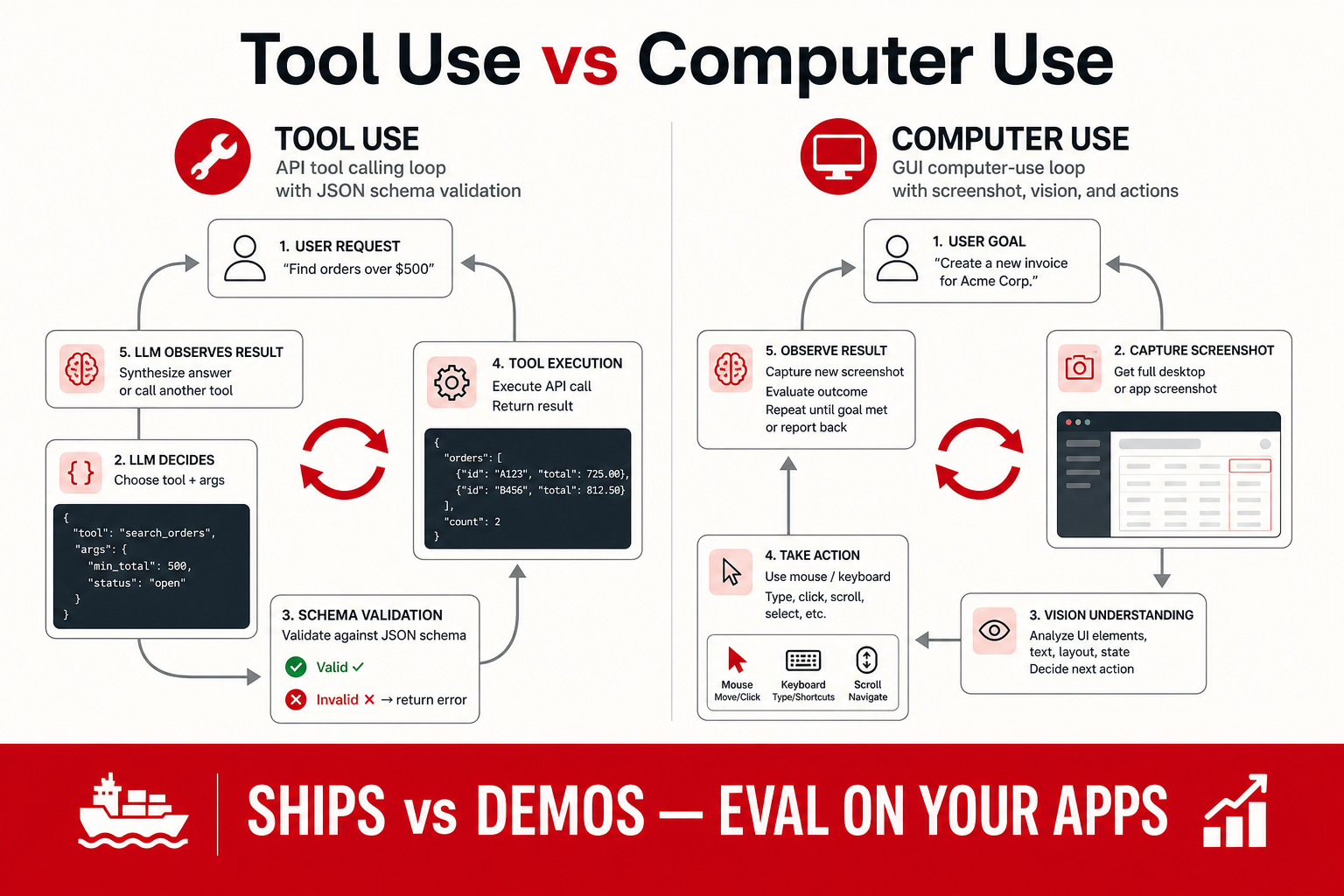
Why “ships vs demos” is the right frame
Marketing for AI agents collapsed two different engineering problems into one word: “agents.” A function that creates a draft Jira ticket via a documented REST endpoint is not the same product category as a vision model that moves a mouse across a legacy ERP with canvas-rendered widgets. Both may appear in the same keynote. Buyers who treat them as equivalent either over-buy desktop automation for problems APIs already solve, or under-invest in API integration because a demo looked like magic.
This report separates tool use LLM patterns—structured actions your runtime validates—from computer use patterns where the model perceives pixels or DOM snapshots and emits low-level actions. We describe what typically ships in enterprise and indie products as of August 2026, what remains demo-grade, and how to run a procurement eval without inventing scores. For architecture context, start with the agent pillar (from chatbot to agent); for safety and abuse, pair with practical AI safety for builders.
Definitions: tool use, computer use, browser use
Tool use (function calling)
Tool use means the model selects from a declared set of functions with JSON (or vendor-equivalent) schemas. Your orchestrator validates arguments, executes against backends, and returns structured results to the context window. Examples: search internal wiki, run read-only SQL, fetch CRM record, call a pricing API, execute sandboxed Python. Major API providers document this pattern explicitly—see OpenAI function calling and Anthropic’s tool-use materials in their Claude documentation.
What makes tool use “production” is not model IQ alone. It is schema design, idempotency keys on writes, timeout handling, structured error payloads, and trace IDs per invocation. A mediocre model with excellent tools beats a frontier model with one giant “do_stuff” function.
Computer use (OS-level GUI control)
Computer use agents combine vision (screenshots or accessibility trees), planning, and input simulation—mouse, keyboard, scroll—to operate applications as a human would. Vendors have shipped research previews and productized variants; public announcements emphasize capability while downplaying variance across machines, display scaling, and permission dialogs.
Failure modes are operational: unexpected modals, multi-factor authentication, OS update prompts, non-standard UI frameworks, and latency between action and screen refresh. Demos often run on clean VMs with frozen state. Your sales team’s laptop with fourteen Chrome extensions is a different environment.
Browser use (narrower action space)
Browser agents restrict actions to a tab: navigate, click, type, extract text, sometimes download files. Playwright-class harnesses (Playwright) and vendor “browser modes” shrink the blast radius compared with full desktop control. Reliability improves when domains are allowlisted and tasks are templated—see our case note on browser agents for research desks.
What actually ships in 2026
Production-ready signals
When we say a capability “ships,” we mean teams report running it on real workflows with SLAs, rollback paths, and incident playbooks—not that it never fails.
- Documented API tool catalogs with versioning, rate limits, and changelog discipline.
- Read-heavy automations (lookup, summarize, draft) with human publish gates.
- Idempotent write tools where duplicate calls do not double-charge or double-ticket.
- Sandboxed code execution with network egress disabled or allowlisted.
- Browser agents on allowlisted internal apps where DOM structure is controlled.
- Observability hooks: per-step traces, model version logging, spend caps (agent failure modes and observability).
Demo-grade signals
- Single-app screencast with no published success rate on diverse sites.
- “Full laptop control” without VM isolation or IT approval story.
- Computer use on consumer login flows with CAPTCHA and device fingerprinting.
- Multi-hour autonomous runs with no max-step or max-cost guardrails.
- No story for prompt injection when the agent reads untrusted web pages (injection risks).
| Capability | Production-ready signal | Demo signal | Typical owner |
|---|---|---|---|
| API tool calling | Documented SLA, schema registry, audit logs | Single-app screencast, no error handling shown | Platform / app engineering |
| RAG + tools hybrid | Citations + tools on private corpus | Generic web search only | Data + app team |
| Browser agent | Your SSO sites pass harness; allowlist enforced | Only works on vendor demo storefront | Automation + security |
| OS desktop agent | IT-approved VM, snapshot rollback, no prod credentials | Full laptop control in marketing clip | IT + platform (pilot only) |
| Multi-agent swarm | Traceable roles, cost per task measured | Agents “talking” with no metrics | ML platform |
Tool use in production: patterns that work
Schema-first design
Production tool layers treat the schema as the contract. Each tool should do one verifiable thing: get_order_status, not handle_customer. Parameters get types, enums, and max lengths. Required fields are explicit. The runtime rejects malformed calls before they touch production databases.
Teams that skip schema discipline see the same failure mode repeatedly: the model emits plausible JSON that almost matches the schema; parsing fails; the agent loops; token spend spikes. Fix the schema and error messages before swapping models.
Read before write
Ship read-only tools first. Let the agent gather state, summarize, and propose actions in natural language. Add write tools behind approval queues or role-based access. This mirrors how mature human ops teams work—and it keeps blast radius small while you tune prompts and evals.
Retrieval as a tool, not a dump
Agents that “remember” by stuffing Slack exports into context do not scale. Expose retrieval as tools with ACL-aware filters. Memory architecture belongs in structured stores; see agent memory: short, long-term, and RAG hybrid and the RAG pillar for when to retrieve vs fine-tune.
Orchestration frameworks vs custom code
LangGraph-style graphs, vendor Agent SDKs, and lightweight custom loops all ship in production. Frameworks help when you need branching, persistence, and human-in-the-loop interrupts. Custom code wins when compliance requires deterministic audit trails or when your business logic should live in tested TypeScript/Python—not prompt prose. Multi-agent patterns add roles but also failure surfaces (multi-agent orchestration patterns).
Computer use reality check
Why demos look better than production
Computer-use demos benefit from selection bias. Recorded paths use known starting URLs, stable layout, and sometimes pre-authenticated sessions. Retry logic off-camera may attempt the same click three times with slightly different coordinates. Human operators may intervene without appearing in the cut.
In production, variance dominates: A/B tested UIs, lazy-loaded content, cookie banners, and locale-specific copy. Vision models misread small text; accessibility trees omit canvas content. A task that succeeded ten times in staging fails on the eleventh because a marketing banner shifted a button by twelve pixels.
When computer use is worth piloting
Narrow workflows with bounded UI surfaces can justify a pilot:
- Internal admin consoles your team controls (stable DOM, no third-party ads).
- Research gathering on allowlisted public sources with citation requirements (browser agents for research desks).
- Legacy systems with no API where RPA already exists—agents as a smarter front-end to Playwright scripts.
- QA exploration with read-only credentials and screenshot artifacts for humans.
Do not pilot computer use for high-risk writes (payments, permissions, production config) without human approval on every mutation.
Browser vs full desktop
Prefer browser-scoped agents when the task lives in the web. Full desktop control expands the action space to email clients, file dialogs, and OS notifications—each a new failure class. Security teams correctly treat desktop agents as endpoint software requiring MDM, network policy, and secrets isolation.
Vendor stacks and open tooling (conceptual map)
We do not rank vendors with synthetic scores. Instead, map your requirement to layers:
| Layer | Examples (public docs) | Your eval question |
|---|---|---|
| Model + tool API | OpenAI, Anthropic, Google Gemini tool docs | Does our JSON schema pass on p95 tasks? |
| Agent SDK / graph | LangGraph, vendor Agents SDK | Can we trace each step and cap cost? |
| Browser harness | Playwright, Puppeteer wrappers | Do our SSO sites survive headless vs headed? |
| Enterprise copilots | Microsoft 365 Copilot, Salesforce Einstein (verify current SKU docs) | Data residency and tool scope match policy? |
| Coding agents | IDE and async workers | See coding agent tools compared |
Leaderboard scores for tool use are sparse and harness-dependent. Read public benchmarks with layer context (how to read AI leaderboards); run private tasks on your endpoints.
Security and compliance cross-cuts
Tool use is a permissions problem dressed as a model problem. Minimum bar for production:
- Least privilege: separate OAuth clients per tool; no god-token.
- Human approval on irreversible writes and external communications.
- Prompt injection defenses when tools fetch untrusted HTML/PDF/email (injection risks).
- Logging with retention policy aligned to GDPR/DPA—prompts may contain PII.
- Kill switch and rate limits per user/tenant.
Safety framing for builders—not legal advice—is in practical AI safety for builders. Computer use on a user’s machine raises additional endpoint risks: keyloggers-by-misconfiguration, exfiltration via “type into notepad,” and social engineering if the agent sends emails.
Eval checklist before you buy or launch
Run this harness on your stack; adjust weights for your risk tolerance.
- Task sample: Record 50–100 real tasks from support, ops, research, or engineering—not synthetic puzzles.
- Success criteria: Define binary pass/fail per task (correct record updated, correct citation captured, correct draft produced).
- Metrics: Success rate, median steps, p95 latency, token cost per success, human intervention rate.
- Failure taxonomy: Tag tool parse errors, auth failures, wrong tool choice, hallucinated success, injection attempts.
- Ablation: Compare API-only vs browser vs desktop on the same task subset—many “need computer use” tasks collapse to one API once someone maps the UI.
- Model version pinning: Log model ID; retest on vendor upgrades (model stack post-train layer moves often).
- Red team: Untrusted page content, malicious PDFs, issue comments on repos—especially for coding agents (coding agents compared).
| Metric | Why it matters | Demo failure pattern |
|---|---|---|
| Human takeover rate | Real cost of “automation” | Not measured |
| Cost per successful task | Unit economics | Only wall-clock in video |
| Auth/session survival | Enterprise reality | Pre-logged demo account |
| Injection block rate | Safety | Not in scope for POC |
| Regression on UI change | Maintenance burden | Single frozen layout |
Decision table: API tool, browser agent, or desktop control?
| Workflow condition | Prefer | Skip or defer when |
|---|---|---|
| Documented API exists and supports needed fields | API tool calling with schema validation | API owner cannot provide versioning or audit logs |
| Web app has stable DOM and approved credentials | Browser-scoped agent with allowlist | SSO, cookie banners, or A/B layouts change weekly |
| Legacy UI has no API and task is read-mostly | Desktop pilot in isolated VM | Workflow touches payments, permissions, or prod config |
| Task needs fast sub-second response | Classical automation or chatbot | Vision screenshots and multi-step loops dominate latency |
Cost and inference implications
Tool loops multiply inference calls. A single user request may trigger three model turns plus retrieval. Computer use adds vision tokens for screenshots. Budget at the task level, not the chat turn level—agent products violate chat-era token assumptions quickly.
Knowledge-worker products stack models, apps, and retrieval; see AI app stack for knowledge workers for where tool use shows up in UX (draft vs act buttons, approval modals). Platform teams should align with inference economics from the model stack pillar before enabling desktop vision on every step.
Buy vs build heuristics
Buy (or adopt vendor copilot) when: data stays in a supported SaaS, tools are pre-integrated, compliance story is documented, and your tasks match their reference architectures.
Build when: you need custom ACL models, cross-system workflows, on-prem constraints, or eval shows vendor computer use fails on your SSO and legacy UI.
Hybrid is common: vendor model API + your tool registry + Playwright for the one screen with no API. Do not build full desktop autonomy because a demo looked impressive.
Procurement questions to ask vendors
When a vendor claims “production agent” or “computer use,” ask for written answers—not slide decks:
- What is measured success rate on customer tasks outside demo apps?
- How are max steps, timeouts, and spend caps configured per tenant?
- What is logged, retained, and deletable under GDPR-style requests?
- How does the product handle prompt injection from web or email tools?
- Which actions require human approval by default?
- What happens on model version upgrades—automatic or pinned?
Vendors who cannot answer these are selling demos. Compare answers against your internal harness results, not against leaderboard marketing.
Desk synthesis: three deployment archetypes
We observe three recurring production shapes in public case studies and conference postmortems—labels are ours, not vendor trademarks:
Archetype 1 — Copilot with tools: Chat UI plus read-mostly tools (search, CRM lookup, ticket draft). Writes go through approval. Computer use absent. Fits support and internal ops. Aligns with rung 2 on the agent map.
Archetype 2 — Browser-bound gatherer: Allowlisted web automation feeding human-reviewed outputs. Common on research and compliance desks (browser agents case). Computer use is scoped to the browser, not the OS.
Archetype 3 — Engineering agent: IDE or async worker with Git, terminal, and CI tools— rarely full desktop vision (coding agents compared). API and CLI predominate over mouse control.
Full desktop computer use appears mainly in pilots and RPA replacement experiments—not yet as default enterprise architecture in desk-reported deployments as of August 2026.
Post-training and tool-use quality
Tool calling quality is largely a post-training and harness story, not raw pretrain IQ. Vendors tune function-call formats, JSON reliability, and parallel tool policies in post-train releases—see layer map in model stack 2026. When a release note mentions “improved tool use,” re-run your schema stress tests even if MMLU-style scores look flat.
Routing smaller models for tool selection and larger models for synthesis is a common inference pattern—multi-agent in miniature (orchestration patterns).
Regional and industry variance
Computer-use pilots stall for predictable non-model reasons: EU cookie walls that shift layout, government SSO with hardware keys, healthcare VDI where screenshots are blocked, and finance desktops where clipboard export is forbidden. Tool-use via approved APIs often remains viable when GUI paths fail—map blockers per region before global rollout.
Industry playbooks differ: retail support agents lean API-first; insurance claims may mix document OCR tools with browser legacy portals; devtools teams mix IDE agents with CI APIs. The knowledge worker stack helps PMs place tool use in product surfaces appropriate to each vertical without copying keynote demos verbatim.
Versioning and change management
Tool registries should version alongside backend services. Typical pattern: get_customer_v2 runs parallel to v1 during migration; agent prompts pin preferred version; metrics compare error rates. Computer-use scripts break silently when CSS changes—schedule visual regression or DOM snapshot tests on critical flows monthly.
When vendors ship new computer-use models, rerun injection and auth suites—not just happy-path tasks. Post-training changes affect tool-call reliability even when GUI model unchanged (model stack).
Who this is for
- Engineering and platform leads deciding API-first vs GUI automation.
- Procurement and IT evaluating agent vendor claims before enterprise rollout.
- Security reviewers scoping tool permissions and injection surfaces.
- Product managers writing requirements that distinguish draft assist from autonomous act.
Who should skip
- Teams with no stable internal APIs and no appetite for browser harness maintenance—fix integrations first.
- Readers seeking a ranked “best computer use model” list—we do not publish unsourced #1 claims.
- Organizations that cannot log, retain, or delete agent transcripts under privacy policy.
- Groups still struggling with single-turn chat quality—stabilize rung 1 before tool loops (agent map).
Common mistakes
| Mistake | Why it fails | Better move |
|---|---|---|
| Desktop agent for API-available data | Brittle, slow, expensive | REST/GraphQL tool first |
| One mega-tool function | Unparseable args, loops | Small composable tools |
| Trusting demo success videos | Selection bias | 50-task private harness |
| No injection testing on web tools | Silent exfiltration | Allowlist + content sanitization |
| Autonomous writes on day one | Irreversible errors | Read-only phase + approval |
| Ignoring observability | Incidents are unreplayable | Traces per tool call |
FAQ
Should we buy computer use on day one?
Only for narrow workflows with sandboxes, allowlists, and human approval on mutations. Default to API tool use for anything with a supported integration.
Is tool use the same as an AI agent?
Tool use is a core agent ingredient, not the whole system. Agents add planning loops, state, policies, and observability. A chatbot with one search tool is a minimal agent; label it honestly in internal docs.
How do we compare OpenAI, Anthropic, and Google tool calling?
Run the same schema and task set on each API with your orchestrator. Public leaderboards rarely reflect your JSON complexity or latency SLOs (leaderboard guide).
Can computer use replace RPA?
Sometimes as a front-end planner, but maintenance and compliance still resemble RPA programs. Expect to own selectors, fallbacks, and monitoring—not fire-and-forget autonomy.
What should we log for compliance?
User ID, tenant, model version, tool name, redacted arguments, tool response hash, approval actor, and timestamp. Align retention with DPA; prompts may contain customer data.
What is the minimum viable tool-use production stack?
At minimum: one LLM API, a tool registry with schema validation, structured logging with trace IDs, max-step and spend caps, and a 50-task eval harness on your endpoints. Add browser or desktop layers only after API tools pass that bar with read-only scopes.
How does computer use interact with enterprise VDI?
VDI often blocks screenshot APIs, adds input latency, and resets sessions—computer use pilots fail for infra reasons unrelated to model quality. Test on real VDI images early or scope agents to API/browser paths that run on server-side harnesses instead of user desktops.
Sources
- OpenAI — Function calling guide — tool schema patterns and API behavior.
- Anthropic — Tool use documentation — Claude tool invocation and computer-use product framing.
- Playwright — browser automation harness used in many agent stacks.
What we did not test: We did not run a proprietary cross-vendor computer-use benchmark or publish success rates for named products. All “ships vs demos” labels are desk heuristics from public documentation and reported production patterns—not EIA-measured rankings.
Corrections: When vendors rename computer-use SKUs, change tool API schemas, or publish new safety policies, update the heuristic tables and as-of date at the top—not isolated adjectives in the SEO title.
Next step
After tool scope is clear, read multi-agent orchestration patterns if you are splitting roles—or agent failure modes and observability before you scale loops. Research teams should continue to browser agents for research desks.