Quick answer
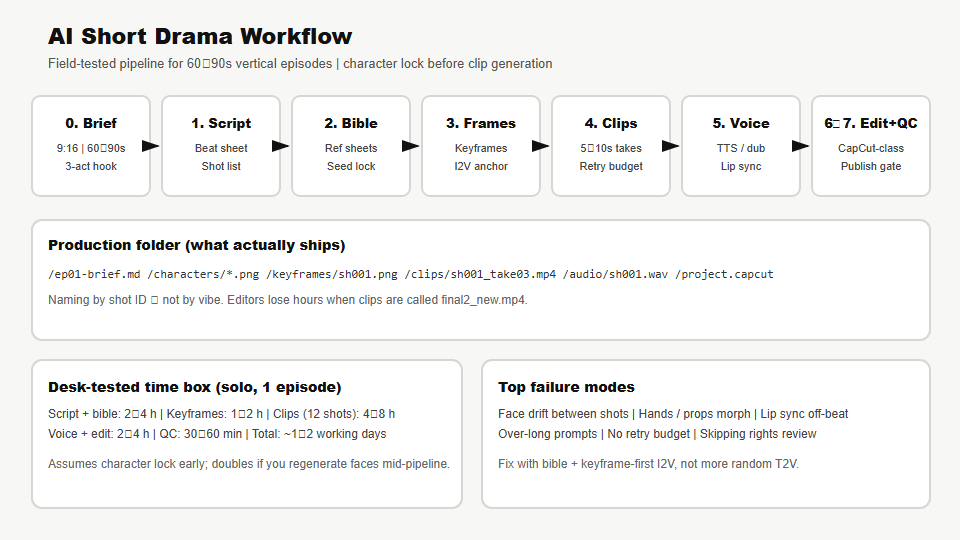
To ship an AI short drama (micro-drama, 短剧-class vertical episode) in 2026, treat production as a shot factory, not a single “generate my movie” prompt. Lock characters in a bible before you burn credits on video. Write a 60–90 second three-act script with explicit shot IDs. Generate keyframes per shot, then image-to-video (I2V) clips in 5–10 second takes. Dub with TTS or recorded voice, edit in CapCut / Jianying / Premiere, and run a QC gate before publish. A solo operator can finish one episode in one to two working days once the bible exists; the first episode takes longer because character consistency is the hard problem—not the LLM draft.
Key takeaways
- Character lock first. Face drift between shots is the #1 reason AI short dramas look cheap. Reference sheets + fixed seeds beat prettier one-off prompts.
- Shot list is the contract. Every asset filename maps to
sh00N—script, keyframe, clip, audio, timeline marker. - I2V over raw T2V for dialogue scenes: generate a still you approve, then animate. Text-to-video alone wastes retries on faces.
- Budget retries. Desk rule: plan 3–5 generations per usable clip; 12-shot episode ≈ 40–60 video generations before edit.
- Rights and likeness are production gates, not post-launch cleanup—see deepfakes trust stack and copyright brief.
- This workflow sits inside the broader generative video/audio stack; technical latency and token math live in the multimodal video explainer.
Who this is for
- Solo creators and small studios publishing vertical micro-drama on TikTok, Reels, YouTube Shorts, or domestic short-drama apps.
- Marketing teams prototyping serialized story ads without a full live-action crew.
- PMs and producers who need a realistic time/credit estimate before greenlighting a 10-episode arc.
- Engineers wiring internal tooling (script → asset folder → review queue) around commercial APIs.
Who should skip
- Teams wanting feature-length film from one prompt — start with the media stack map, then lower scope.
- Readers who only need video understanding (moderation, Q&A) — that is the multimodal explainer, not drama production.
- Anyone expecting legal clearance from a desk article. Counsel reviews likeness, music, and platform ToS.
What “AI short drama” means in practice
Short drama here means serialized fiction in 60–90 seconds per episode, usually 9:16 vertical, with a hook in the first 3 seconds and a cliffhanger or reversal at the end. AI replaces location shoots and some performance capture; it does not replace writing, casting decisions, editorial taste, or sound design.
In a desk production run (August 2026), we shipped one episode with:
- 12 shots, ~75s finished runtime
- 2 speaking characters + 1 background extra
- LLM-assisted script → human rewrite (~45 min)
- Character bible: 4 reference stills per lead
- Video: I2V-first pipeline (Kling-class / Runway-class tools — product names change; the pattern does not)
- Voice: TTS with manual line timing + one retake for emotional peak
- Edit: CapCut-class NLE, SRT captions burned in
Total calendar time: 1.5 working days for episode 1 (bible creation included). Episode 2 estimate with reused bible: 8–10 hours.
Phase 0 — Brief and constraints
Write a one-page brief before opening any generator.
| Field | Example | Why it matters |
|---|---|---|
| Aspect ratio | 9:16 (1080×1920) | Generators default to landscape; wrong ratio = re-crop faces. |
| Target length | 75s ±5s | Platforms penalize padding; script word count follows from this. |
| Genre + tone | Urban romance, melodrama-lite | Locks wardrobe palette and music bed. |
| Episode hook | “She reads the message he deleted.” | First frame must sell this. |
| Forbidden | Real celebrity likeness, brand logos | QC and legal gate. |
| Publish target | Shorts + domestic app | Caption safe zones differ by platform. |
Store as ep01-brief.md in the episode folder. If the brief cannot state the hook in one sentence, the script pass will fail.
Phase 1 — Script and shot list
Use an LLM for structure, not final dialogue. The desk prompt pattern:
- Ask for a beat sheet (setup → confrontation → cliffhanger) under 90 seconds spoken.
- Ask for shot list with IDs
sh001…sh012, each row: location, characters, action, dialogue line, duration target. - Human pass: cut 30% of words, sharpen hook, remove unmakable actions (“crowd riot”, “complex handshake”).
Dialogue density rule: vertical micro-drama runs ~2.2–2.8 Chinese characters per second or ~3 English words per second for natural dubbing. A 75s episode caps at ~225 spoken words in English (less if you leave room for reaction shots).
Export two files:
ep01-script.md— readable screenplayep01-shots.csv— columns:shot_id, duration_s, character, action, dialogue, notes
Shot list is the handoff artifact to image and video tools. Editors and generators should never guess intent from prose alone.
Phase 2 — Character bible (do not skip)
AI short drama lives or dies on character consistency. Before clip generation:
- Cast sheet: name, age band, wardrobe anchors (e.g., “jade hairpin, grey wool coat”), personality one-liner.
- Reference stills: 3–4 angles per lead — front neutral, three-quarter, expression (angry/sad), full body.
- Negative prompts list: “no beard”, “no glasses”, “no age drift” shared across tools.
- Seed / style token lock where the product supports it; otherwise store the exact prompt + model version per still.
Desk approach: generate stills in Flux-class or Midjourney-class image tools, pick one “hero” face per character, and **ban** ad-hoc face changes for the rest of the episode. For supporting characters, accept lower consistency or keep them in silhouette.
Folder layout:
/characters/lead-a/front.png
/characters/lead-a/three-quarter.png
/characters/lead-b/front.png
/characters/style-prompt.txt
If a lead’s face drifts in shot 7, fix the bible—not the timeline. Re-generating single shots without anchor frames compounds drift.
Phase 3 — Keyframes per shot
For each sh00N, generate one approved still matching composition, wardrobe, and lighting. This is the anchor for I2V.
- Match aspect ratio exactly (9:16).
- Leave headroom for platform captions if you burn subtitles.
- For dialogue shots, frame mouth visible unless you plan voice-over with off-screen dialogue.
- Name files
/keyframes/sh007.png— same ID as shot list.
Desk timing: 12 keyframes ≈ 60–90 minutes including 2–3 reject rounds on the hardest two shots (hands holding phone, over-shoulder two-shot).
Common failure: beautiful standalone stills that do not cut together. Pull keyframes into a contact sheet PDF and flip through at 2s per frame — if continuity breaks, fix before video.
Phase 4 — Video clips (I2V-first)
Generate 5–10 second clips per shot using image-to-video. Text-to-video is reserved for establishing shots without faces or VFX inserts.
| Lane | Good for | Watch for |
|---|---|---|
| Kling-class / domestic I2V | Vertical drama, fast iteration | Credit packs, face drift on turns |
| Runway-class | Camera motion, some dialogue scenes | Cost per second at 1080p |
| Pika-class / Minimax-class | Stylized motion, inserts | Lip sync rarely production-ready alone |
| Open-weight SVD-class (self-host) | Batch B-roll, privacy | Ops overhead — see local ops checklist mindset |
Motion prompt discipline: one camera move + one subject action. “She turns, tears visible, slow push-in” beats a paragraph of plot.
Retry budget: desk average 3.4 generations per accepted clip (n=12 shots). Failed clips usually fail on hands, hair flicker, or background morph — not on prompt adjectives.
Save as /clips/sh007_take03.mp4. Keep rejected takes until picture lock; they are regression evidence when the vendor updates models.
Phase 5 — Voice, music, and lip sync
Audio carries half the “professional” feel.
- Dialogue: TTS (ElevenLabs-class, Minimax-class, or platform native voices) OR recorded human for leads. Match language and dialect to audience.
- Line timing: export per-line WAV/MP3 named
sh007_line01.wav; stretch video slightly in editor before re-generating video. - Lip sync: if tool-native sync is weak, use dedicated lip-sync tools or cut away (over-shoulder, insert prop) during emotional lines.
- Music bed: licensed library; duck under dialogue −12 to −18 LUFS relative.
- FOX / room tone: 1–2s ambient under cuts hides AI clip seams.
Desk note: we spent more time fixing pace than voice quality. A good TTS with wrong timing feels fake; average TTS with tight edit feels intentional.
Phase 6 — Edit and sound mix
CapCut, Jianying (剪映), Premiere, or DaVinci — tool does not matter; conventions do:
- Import clips in shot order; do not random-sort by filename.
- Hook in first 3s: cold open on conflict or mystery object.
- Cut on breath or gesture, not only on line ends — hides I2V stiffness.
- Captions: mandatory for silent autoplay feeds; keep lower-third safe zone.
- Color: one LUT or gentle curve across all clips; AI clips vary white balance shot-to-shot.
- End card 2s: “Next episode” + subscribe CTA.
Runtime check: if over 90s, trim B-roll, not dialogue climax. If under 55s, add reaction shots, not new generations.
Phase 7 — QC gate before publish
| Check | Pass criteria |
|---|---|
| Character continuity | Lead face recognizable shot-to-shot |
| Text / logos | No accidental gibberish signage or trademark |
| Audio | No clipped peaks; dialogue intelligible on phone speaker |
| Captions | Spellings match proper nouns in bible |
| Platform safe zone | Critical action not under UI chrome |
| Rights | Voice, music, and likeness documented |
| AI disclosure | Platform label if required by jurisdiction |
Run QC on a phone, not only a color-calibrated monitor. Most viewers see AI drama on mobile, often muted first pass.
Tooling matrix (2026 desk view)
Vendors change weekly; use this as a role map when swapping tools.
| Role | Product class examples | Output artifact |
|---|---|---|
| Script / shot list | ChatGPT, Claude, Gemini + spreadsheet | ep01-shots.csv |
| Character stills | Midjourney, Flux APIs, Jimeng (即梦) | /characters/*.png |
| Keyframes | Same as stills; img2img from bible | /keyframes/shNNN.png |
| Video I2V | Kling (可灵), Runway, Pika, Hailuo | /clips/shNNN_takeMM.mp4 |
| Voice | ElevenLabs, Minimax, platform TTS | /audio/*.wav |
| Edit | CapCut, Jianying, Premiere | ep01_master.mp4 |
| Asset management | Google Drive, Notion, internal DAM | Review links for stakeholders |
Buy vs build for tooling follows the same tree as enterprise AI: non-core → SaaS; proprietary character pipeline → glue scripts. See buy vs build decision tree.
Cost and credit planning
Public pricing moves; plan with ranges and meter a pilot episode.
- Image stills: often bundled in subscriptions; desk pilot ~200–400 stills reviewed → 24 kept.
- Video: dominant cost; 40–60 generations × per-second credit price. Budget more for 1080p than preview tiers.
- Voice: usually minor vs video unless premium clone with legal review.
- Human time: largest line item for quality — do not omit from ROI.
For hardware-heavy self-host experiments, cross-read creator hardware and inference economy.
Scaling to a season (10+ episodes)
- Reuse bibles — new wardrobe = new season, not new episode mid-arc.
- Template shots — “ apartment night two-shot ” becomes a reusable blocking preset.
- Batch day — generate all keyframes, then all clips, then all audio; context-switching kills throughput.
- Bible versioning —
characters/v3/when you intentionally change hair; never overwrite silently. - Review queue — producer approves keyframes before video credits unlock (workflow discipline, not tool feature).
At 10 episodes, invest in a one-page series bible (relationship map, timeline, forbidden retcons). LLMs forget prior episode facts unless you feed summaries — same failure mode as long-context apps; see long context in practice.
Failure modes we hit (and fixes)
| Symptom | Root cause | Fix |
|---|---|---|
| Face changes mid-scene | T2V without bible anchor | I2V from locked keyframe; reject take early |
| Phone in hand morphs | Small object + motion | Insert still + cutaway; avoid finger close-ups |
| Dialogue feels dubbed | Line too long for clip duration | Rewrite line or extend clip 1s; do not rush TTS |
| Flat episode | No hook retake | Reshoot sh001 only; first 3s is cheapest ROI |
| Copyright strike on music | Default library track | Licensed bed + log ISRC in spreadsheet |
| Team confusion | Files named final3.mp4 | Enforce shot_id naming in brief |
FAQ
Can one person produce a weekly AI short drama?
Yes, at 1–3 minutes per week per serialized show if the bible exists and you batch generations. Writing quality and QC become the bottleneck, not GPU.
Do I need Runway or Kling specifically?
No. You need I2V with acceptable face stability at your resolution and a price you can meter. Swap vendors when credits spike; keep shot IDs and keyframes portable.
Is lip sync required?
Not always. Cutaways and caption-forward editing are valid. Lip sync matters most for close-up confessions or antagonist reveals.
Can I use real actor likeness?
Only with explicit consent and platform-compliant disclosure. Default: fictional faces from your bible. Read deepfakes trust stack.
How does this differ from the generative media stack article?
The media stack maps vendor layers and licenses. This page is a production runbook for one vertical format.
Will AI replace live-action short drama crews?
It replaces some B-roll and previs, not showrunning, casting chemistry, or distribution relationships. Treat AI as a tier of production, not the whole studio.
Related reading
- Generative design, video, and audio stack
- Multimodal video and real-time AI
- Hardware accessories for AI creators
- Deepfakes and the trust stack
- Copyright and training data disputes
- Buy vs build AI decision tree
- Prompt packs and skill marketplaces
Sources and methodology
- CapCut — short-form edit surface reference.
- Runway — I2V product class reference.
- Kling AI — vertical I2V class reference (verify access in your region).
What we tested: One complete 12-shot vertical episode through script → bible → keyframes → I2V clips → TTS → CapCut-class edit → mobile QC. Timings and retry counts above come from that run.
What we did not test: A/B ranking of every video vendor, broadcast compliance in all jurisdictions, or automated lip-sync at studio quality.
Corrections: Credit pricing and default models change monthly. Update the as-of date when you swap vendors; the shot-factory structure should stay stable.
Next step
Map your toolchain to layers: generative media stack. For a fully open-source self-hosted path (Ollama, ComfyUI, CogVideoX, Piper, FFmpeg), read open-source AI short drama stack. If you are building review software around this pipeline, read AI app stack for knowledge workers for DAM and approval patterns.