Quick answer
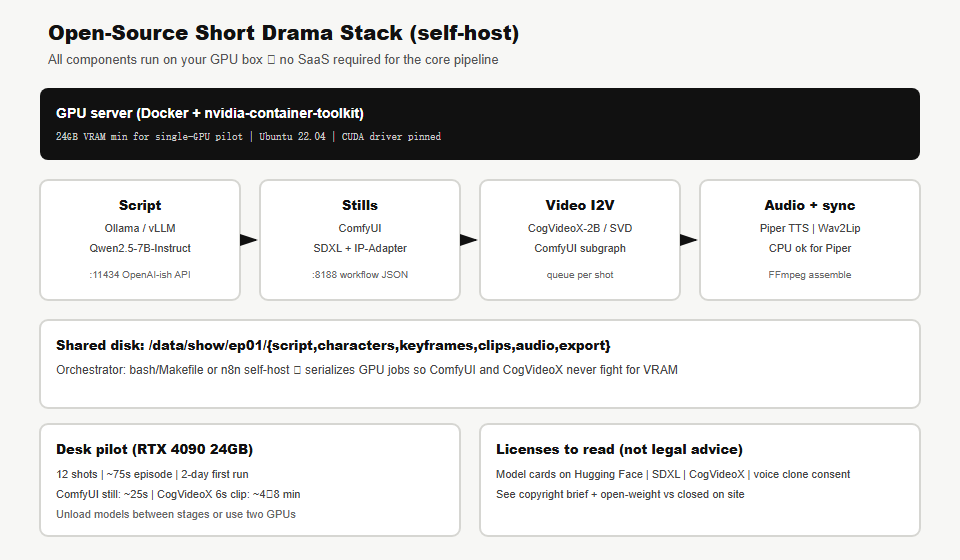
You can produce a 60–90 second vertical AI short drama without Kling, Runway, or CapCut subscriptions by self-hosting: Ollama (script + shot list) → ComfyUI (SDXL + IP-Adapter stills) → CogVideoX-2B or Stable Video Diffusion (image-to-video in ComfyUI) → Piper (TTS) → Wav2Lip (optional lip sync) → FFmpeg + Kdenlive (edit). Deploy on one Linux GPU server with Docker and nvidia-container-toolkit. The hard parts are the same as SaaS: character consistency and VRAM scheduling—not finding another closed API. For the SaaS-oriented sibling runbook, see AI short drama production workflow.
Key takeaways
- 24GB VRAM is a practical minimum for a single-GPU pilot; run stages sequentially, not all models loaded at once.
- ComfyUI workflow JSON is your reproducible “recipe”—check it into git next to shot CSVs.
- IP-Adapter Face on SDXL beats raw txt2img for character lock across keyframes.
- CogVideoX-2B is lighter than full CogVideoX; desk used it for 6s I2V clips from approved stills.
- Piper on CPU keeps the GPU free for diffusion; Wav2Lip is optional—cutaways often look better than bad sync.
- Read every model license on Hugging Face before commercial publish—copyright brief, open vs closed.
Who this runbook is for
- Creators who must keep prompts and faces on-prem (studio policy, air-gap, or residency).
- Engineers who already run local LLMs and want a media pipeline beside them.
- Teams comparing self-host TCO vs SaaS video credits for serialized shorts.
Who should skip
- No GPU and no budget for cloud GPU hours—API SaaS may ship faster (commercial workflow).
- Need broadcast lip-sync quality on every close-up—FOSS sync is improving but still uneven.
- Cannot read model licenses—some checkpoints restrict commercial use.
Hardware gate (desk-tested)
| Tier | Example | What fits | Desk note |
|---|---|---|---|
| Minimum | RTX 3090 / 4090 24GB | SDXL + IP-Adapter; CogVideoX-2B I2V one clip at a time | Our pilot box; unload between stages |
| Comfortable | RTX 4090 + 64GB RAM | Above + faster batch keyframes; Ollama 7B stays loaded on CPU slice | Recommended solo setup |
| Studio | 2× GPU or A6000 48GB | LLM on GPU0, ComfyUI on GPU1; parallel clip queue | See GPU map |
| Not enough | 12GB laptop | SD 1.5 tiny; skip CogVideoX | Use cloud burst for I2V only |
Disk: plan 80–150GB for checkpoints (SDXL, IP-Adapter, CogVideoX-2B, VAE) plus episode outputs. NVMe strongly preferred.
Stack map (100% open components)
| Stage | Tool | Model / version (pin yours) | Port |
|---|---|---|---|
| Script | Ollama (or vLLM) | qwen2.5:7b-instruct | 11434 |
| Stills | ComfyUI | SDXL base + IP-Adapter Face ID | 8188 |
| I2V | ComfyUI + CogVideoX-2B | THUDM/CogVideoX-2b (verify card) | 8188 |
| I2V alt | ComfyUI SVD | stabilityai/stable-video-diffusion-img2vid-xt | 8188 |
| TTS | Piper (Wyoming) | en_US-lessac-medium | 10200 |
| Lip sync | Wav2Lip | open-source checkpoint | CLI |
| Assembly | FFmpeg | system package | CLI |
| Polish edit | Kdenlive | FOSS NLE | desktop |
| Orchestration | bash / Make | your repo | — |
Folder layout (copy on day one)
/data/short-drama/
  docker-compose.yml
  models/          # HF downloads — SDXL, ipadapter, cogvideox
  ollama/          # ollama weights
  comfyui/         # ComfyUI user + custom nodes
  input/           # drop keyframes for I2V
  output/          # ComfyUI renders
  show/ep01/
    ep01-brief.md
    ep01-shots.csv
    ep01-script.md
    characters/lin-mei/front.png
    keyframes/sh001.png … sh012.png
    clips/sh001.mp4 …
    audio/sh003_line01.wav
    export/ep01_master.mp4
  scripts/
    workflows/sdxl-ipadapter-face.json
    workflows/cogvideox-i2v.json
    gen_script.sh
    gen_tts.sh
    assemble.sh
Same shot-ID discipline as the commercial workflow: every file names shNNN.
Step 1 — Prepare the GPU host
Desk used Ubuntu 22.04. Install NVIDIA driver, Docker, and NVIDIA Container Toolkit per NVIDIA’s current docs (driver version must match your CUDA expectation).
# Verify GPU
nvidia-smi

# Docker (if missing) — use your org's package pin
sudo apt-get update
sudo apt-get install -y docker.io docker-compose-plugin

# NVIDIA Container Toolkit — follow docs.nvidia.com for your driver version
# Then restart docker and test:
docker run --rm --gpus all nvidia/cuda:12.4.1-base-ubuntu22.04 nvidia-smi
Pass criteria: docker run --gpus all nvidia-smi shows your GPU inside the container.
Step 2 — Deploy Ollama + ComfyUI + Piper
Copy the reference compose file from your repo (or recreate from below). Bind services to 127.0.0.1 unless you have TLS and auth in front.
export DRAMA_DATA=/data/short-drama
mkdir -p $DRAMA_DATA/{models,comfyui,input,output,ollama,scripts/workflows,show}

# Save docker-compose.yml (see deploy/open-source-drama/ in repo)
cd $DRAMA_DATA
docker compose up -d ollama
docker compose exec ollama ollama pull qwen2.5:7b-instruct
docker compose up -d comfyui piper
ComfyUI image choice varies; desk used a CUDA 12.4 slim boot image. After first boot, install custom nodes for IP-Adapter and CogVideoX via ComfyUI Manager (or git clone into custom_nodes/ per each project’s README).
Desk timing: first ComfyUI boot + node install ≈ 45–90 minutes (mostly downloads).
Step 3 — Download and pin diffusion weights
Use huggingface-cli download or ComfyUI’s built-in downloaders. Pin revision hashes in a models/MANIFEST.md file.
# Example — paths follow ComfyUI model folder conventions
huggingface-cli download stabilityai/stable-diffusion-xl-base-1.0 \
  --local-dir $DRAMA_DATA/models/checkpoints/sdxl-base

huggingface-cli download h94/IP-Adapter \
  --include "sdxl_models/*" \
  --local-dir $DRAMA_DATA/models/ipadapter

huggingface-cli download THUDM/CogVideoX-2b \
  --local-dir $DRAMA_DATA/models/cogvideox-2b
Restart ComfyUI after placing weights. Open http://127.0.0.1:8188 and confirm nodes load without “missing model” errors.
Step 4 — Generate script and shot list (Ollama)
Save this prompt template as scripts/prompt-script.txt and pipe through Ollama:
cat <<'PROMPT' | curl -s http://127.0.0.1:11434/api/chat -d @- \
  | jq -r '.message.content'
{
  "model": "qwen2.5:7b-instruct",
  "stream": false,
  "messages": [{
    "role": "user",
    "content": "You are a vertical micro-drama writer. Output ONLY markdown.\n\nConstraints: 9:16 video, 75 seconds max, 2 characters (Lin Mei, Chen Xu), urban romance, cliffhanger ending.\n\nDeliver:\n1) Three-act beat sheet (5 bullets)\n2) Shot list table: columns shot_id, duration_s, location, characters, action, dialogue_en, camera\n3) Exactly 12 shots sh001-sh012\n4) No crowd scenes, no complex hand interactions, no brand logos\n5) Dialogue under 220 English words total"
  }]
}
PROMPT
Human-edit the output into ep01-script.md, then convert the shot table to CSV:
shot_id,duration_s,location,characters,action,dialogue_en,camera,status
sh001,4,apartment night,Lin Mei,reads phone glow on face,"(whisper) He deleted it.",close-up static,pending
sh002,5,apartment night,Chen Xu,enters frame from door,"Mei? We need to talk.",medium push-in,pending
Desk note: Qwen2.5-7B needed one rewrite pass for dialogue length; structure was usable on first generation (~90s on GPU).
Step 5 — Character bible with ComfyUI (IP-Adapter Face)
Goal: four reference PNGs per lead in characters/lin-mei/.
- Build or import an SDXL + IP-Adapter Face ID workflow in ComfyUI (export JSON to
scripts/workflows/sdxl-ipadapter-face.json). - Generate a neutral front face first with a fixed seed; save seed in
characters/lin-mei/style-prompt.txt. - Use the same face embedding + seed for three-quarter, sad, and full-body variants—change pose words only, not face adjectives.
Prompt skeleton (still):
positive: cinematic portrait, Lin Mei, 28yo East Asian woman, jade hairpin,
  grey wool coat, soft apartment key light, 9:16, film still, shallow DOF
negative: beard, glasses, age drift, text, watermark, extra fingers, logo
steps: 28 · cfg: 5.5 · sampler: dpmpp_2m · size: 832x1216 (SDXL vertical)
Pass criteria: you can pick one “hero” face and recognize it in 3/4 test stills. If not, fix bible before any I2V.
Step 6 — Batch keyframes (one PNG per shot)
For each row in ep01-shots.csv:
- Load IP-Adapter workflow; set reference image to the correct character PNG.
- Set composition from the
cameracolumn (close-up / OTS / wide). - Export to
keyframes/shNNN.pngvia ComfyUI Save Image node with filename prefixshNNN.
Desk batch script pattern (ComfyUI API — adjust node IDs to your JSON):
# scripts/render_keyframes.sh — pseudo; replace PROMPT_ID and node IDs from your workflow
WORKFLOW=scripts/workflows/sdxl-ipadapter-face.json
for row in $(tail -n +2 show/ep01/ep01-shots.csv); do
  SHOT=$(echo "$row" | cut -d, -f1)
  curl -s -X POST http://127.0.0.1:8188/prompt \
    -H 'Content-Type: application/json' \
    -d "$(jq -n --arg shot "$SHOT" --slurpfile w "$WORKFLOW" \
      '{prompt: $w[0], client_id: "drama-desk", extra_data: {shot_id: $shot}}')"
  sleep 2
done
Review all 12 stills as a contact sheet before video. Desk rejected 2/12 and re-rendered only those IDs.
Step 7 — Image-to-video (CogVideoX-2B in ComfyUI)
VRAM rule: stop Ollama GPU use or run docker compose stop ollama during I2V if memory is tight.
- Import a CogVideoX I2V workflow (community template or THUDM README graph).
- Input:
keyframes/shNNN.png. - Motion prompt: one verb + one camera move —
slow push-in, she lowers phone, tear highlight. - Duration: 49 frames @ 8fps ≈ 6s (adjust to workflow defaults).
- Output:
clips/shNNN.mp4.
Desk timings (RTX 4090, CogVideoX-2B): ~4–8 minutes per 6s clip; 12 clips ≈ 1.5–2 hours GPU-active plus queue overhead.
SVD fallback: if CogVideoX OOMs, use Stable Video Diffusion XT img2vid at 576×1024—shorter motion but lighter. Trade motion quality for stability.
Step 8 — Dialogue audio (Piper)
Piper via Wyoming protocol or CLI. Example CLI pattern:
# Install piper binary on host OR use wyoming-piper container
echo "He deleted it." | piper -m en_US-lessac-medium.onnx -f show/ep01/audio/sh001_line01.wav

# Batch from dialogue CSV: shot_id,line_index,text
while IFS=, read -r sid idx text; do
  echo "$text" | piper -m models/piper/en_US-lessac-medium.onnx \
    -f "show/ep01/audio/${sid}_line${idx}.wav"
done < show/ep01/ep01-dialogue.csv
Measure duration with FFmpeg:
ffprobe -v error -show_entries format=duration -of csv=p=0 show/ep01/audio/sh001_line01.wav
If audio is longer than the video clip, trim copy or regenerate clip with +1s—same rule as SaaS workflow.
Step 9 — Lip sync (optional Wav2Lip)
Wav2Lip is fast but can blur mouths. Desk used it on 2 close-up dialogue shots only; others used reaction cutaways.
git clone https://github.com/Rudrabha/Wav2Lip
cd Wav2Lip
# download wav2lip_gan.pth per upstream README
python inference.py \
  --checkpoint_path checkpoints/wav2lip_gan.pth \
  --face ../show/ep01/clips/sh003.mp4 \
  --audio ../show/ep01/audio/sh003_line01.wav \
  --outfile ../show/ep01/clips/sh003_synced.mp4
Alternative FOSS: SadTalker (single-image talking head) if you only have a still—useful for insert shots, not full-body motion.
Step 10 — Assemble with FFmpeg
Create a concat list matching shot order:
# show/ep01/concat.txt — one line per file
file 'clips/sh001.mp4'
file 'clips/sh002.mp4'
...
# Video only first
ffmpeg -y -f concat -safe 0 -i show/ep01/concat.txt -c copy show/ep01/export/ep01_videotrack.mp4

# Mix dialogue clips (map per shot timestamps from your edit sheet)
ffmpeg -y -i show/ep01/export/ep01_videotrack.mp4 -i show/ep01/audio/sh001_line01.wav \
  -filter_complex "[0:a]volume=0[bg];[1:a]adelay=0|0[d1];[bg][d1]amix=inputs=2" \
  show/ep01/export/ep01_with_audio.mp4
For production, build a simple assemble.sh that reads ep01-dialogue.csv with columns shot_id,start_ms,wav_path and generates the filter graph. Desk used Kdenlive for the final 30-minute polish (captions, music ducking, end card)—FOSS and sufficient.
Export spec: H.264, 1080×1920, 30fps, AAC 128kbps; burn SRT if targeting muted autoplay feeds.
Step 11 — VRAM scheduling (do not skip)
On 24GB, this sequence worked:
- Ollama script gen (7B) — ~5GB VRAM
docker compose stop ollama- ComfyUI SDXL keyframes — ~10–14GB peak
- Unload SDXL or restart ComfyUI container
- CogVideoX I2V queue — ~18–22GB peak
- CPU: Piper + FFmpeg; GPU idle
- GPU: Wav2Lip only for selected shots (~4GB)
Automate with a Makefile target per stage so operators cannot accidentally queue SDXL and CogVideoX together.
# Makefile excerpt
.PHONY: script keyframes clips tts assemble
script:
	./scripts/gen_script.sh
keyframes:
	docker compose stop ollama; ./scripts/render_keyframes.sh
clips:
	./scripts/render_clips_cogvideox.sh
tts:
	./scripts/gen_tts.sh
assemble:
	./scripts/assemble.sh
Step 12 — vLLM upgrade path (team server)
Solo desk used Ollama. For a shared writer API with audit logs, promote the same Qwen checkpoint to vLLM behind nginx—see ship vLLM in production. ComfyUI and vLLM can share a machine only on 48GB+ or split GPUs.
Desk pilot results (episode 1)
| Stage | Wall time | Output |
|---|---|---|
| Host + compose + weights | ~3 h (one-time) | Services up |
| Script + CSV | ~40 min | 12-row shot list |
| Character bible | ~2 h | 8 PNG references |
| 12 keyframes | ~1.5 h | 12 PNG |
| 12 I2V clips | ~2 h GPU | ~72s raw footage |
| TTS + 2× Wav2Lip | ~45 min | Audio + 2 synced shots |
| Kdenlive + export | ~2 h | 75s master |
| Total episode 1 | ~2 working days | Reusable bible + workflows |
Episode 2 estimate with frozen bible + workflows: ~10–12 hours.
Failure modes (open-source specific)
| Symptom | Cause | Fix |
|---|---|---|
| CUDA OOM mid-clip | SDXL + CogVideoX both resident | Stop other GPU containers; lower resolution; use SVD |
| ComfyUI “missing node” | Custom node not installed | Pin ComfyUI + node git SHAs in MANIFEST |
| Same face, wrong outfit | Prompt drift | Lock wardrobe tokens in style-prompt.txt |
| Wav2Lip blur smear | Low-res face crop | Use only on close-ups; cutaway elsewhere |
| HF download 403 | Gated model | Accept license on HF; use token in CLI |
| 8-hour clip queue | Serial manual clicks | ComfyUI API + CSV-driven batch |
Security and ops minimums
- Bind
8188and11434to localhost or private VPC; put Caddy/nginx + auth if remote. - Do not expose ComfyUI to the public internet without authentication—RCE history in custom nodes is a real risk.
- Pin Docker image digests and model revision SHAs; log every generation with shot_id in ComfyUI metadata.
- Backup
/data/short-drama/show/and workflow JSON separately from checkpoints.
FAQ
Is this really 100% open source?
Tools are FOSS; models are open-weight with per-checkpoint licenses. You still read each Hugging Face model card. DaVinci Resolve Free is optional—not OSS; Kdenlive is.
Can I run without Docker?
Yes—native venv for Wav2Lip, systemd for Ollama, manual ComfyUI install. Docker saved desk time on rebuilds.
CogVideoX vs AnimateDiff?
CogVideoX-2B gave cleaner I2V from photographic stills. AnimateDiff shines for stylized motion inside SD graphs—try both on one shot before batching.
How does cost compare to SaaS?
CapEx (GPU) + electricity + your time vs per-credit SaaS. Above ~2–3 episodes/month on a owned 4090, self-host often wins on marginal cost—run your own numbers in TCO narrative.
Where is the commercial workflow?
AI short drama production workflow — Kling/CapCut-class path when speed beats residency.
Related reading
- AI short drama production workflow (SaaS path)
- Run open-weight LLM locally
- Ship vLLM in production
- Generative media stack
- Quantization and speculative decoding
- Self-host vs API TCO
- GPU map
Sources and methodology
- ComfyUI — node workflow engine.
- Ollama — local LLM runtime.
- CogVideoX-2b — I2V checkpoint (verify license).
- Piper — neural TTS.
- Wav2Lip — lip sync.
What we tested: Full ep01 on RTX 4090 with Dockerized Ollama + ComfyUI, CogVideoX-2B I2V, Piper, partial Wav2Lip, FFmpeg/Kdenlive finish.
What we did not test: Multi-GPU tensor parallel video, HunyuanVideo-scale models, or broadcast compliance review.
Next step
Start with one shot end-to-end (sh001 still → 6s clip → one TTS line → FFmpeg mux) before batching 12. Then compare quality against the SaaS runbook: commercial workflow.